
Dashboard
The first screen shows a notice for open work and your open-task list. Carried-over items and work waiting for a supervisor review appear there as well.
AI SERVICES
AI WORK AUTOMATION
Let recurring reports and reviews continue in the SE Dashboard.
The SE Work management dashboard (SE Dashboard) shows today’s tasks, supervisor reviews, and project status on one screen. We introduce only features actually in use, such as today and next-day work goals and completion reports, My work, the client schedule, and automatic payment-message and card logging.
We first look at the way you work today, then configure only the features you need. We stay with you from consultation through planning, development, a trial run, and support after launch.
Sample screenFictional case
Kim Yesi
Staff · Example team
Kim Yesi, you have open work. Please check it.
3 open · 1 carried over · 1 waiting for supervisor review. The notice stays until supervisor review, in-progress, and completion are all finished.
Project status
DOES THIS SOUND FAMILIAR?
As the work increases, reports and reviews get scattered, and you have to ask around to find out who has done what.

Today’s tasks and reports are scattered in many places. The same information is written again in chats, notes, and spreadsheets.
Things get missed when work is handed over. What is in progress lives only in someone’s memory.
Unfinished work is left only in someone’s memory the next day. The same material has to be gathered again to check it.

It is not clear who should review a task. The same question is asked more than once.

A required review is sometimes skipped before work moves to the next step.
Incoming payment messages are copied by hand, so records are often late or missing.
OUR SOLUTION
This is not about adding more tools. We introduce only features actually used in the SE Dashboard in-house, then configure the items you need to match the way you work today.
We start with the purpose. We first agree on who needs to check what, and when.
We look for where reports, reviews, assignments, and records break off, then connect them on one screen.
We configure only the features you need. We do not widen unused menus, and we match the screens people actually use.
We open the system after a trial run. You use it, we adjust it, and we stay with you for support afterward.
WHAT THE DASHBOARD DOES
The items below are features actually in use. In consultation we choose what you need, then configure them. We do not invent features that are not there.
The first screen shows a notice for open work and your open-task list. Carried-over items and work waiting for a supervisor review appear there as well.
Work goals are submitted line by line with a task name and expected time. Each line becomes one work card. Completion reports are recorded separately.

Each card continues in this order: data backup, client delivery, waiting for a revision request, supervisor report, supervisor review, in progress, and complete. The system keeps that order, and each step records who reviewed it and when.
Work that a direct report has taken through the supervisor-report step is gathered in My reviews. It moves on only after the supervisor reviews it.
The dashboard gathers progress and next actions by project. You can also view them by staff member.
Client schedules and project progress are reviewed in one table. Public sample screens use fictional names only.

The screens you see depend on the role: principal, manager, staff, or newcomer. Admin mode can be used only from allowed locations, with two-factor authentication and an audit log.

Incoming messages are saved as records, so you do not have to copy them by hand. Messages that do not match the format, or that need a check, are gathered separately, with a record of who handled them and when.
SAMPLE SCREEN
The screen below is a fictional sample. It does not use real names or real data.
Sample screenFictional case
Kim Yesi
Staff · Example team
Kim Yesi, you have open work. Please check it.
3 open · 1 carried over · 1 waiting for supervisor review. The notice stays until supervisor review, in-progress, and completion are all finished.
Project status
A DIFFERENT WAY TO WORK
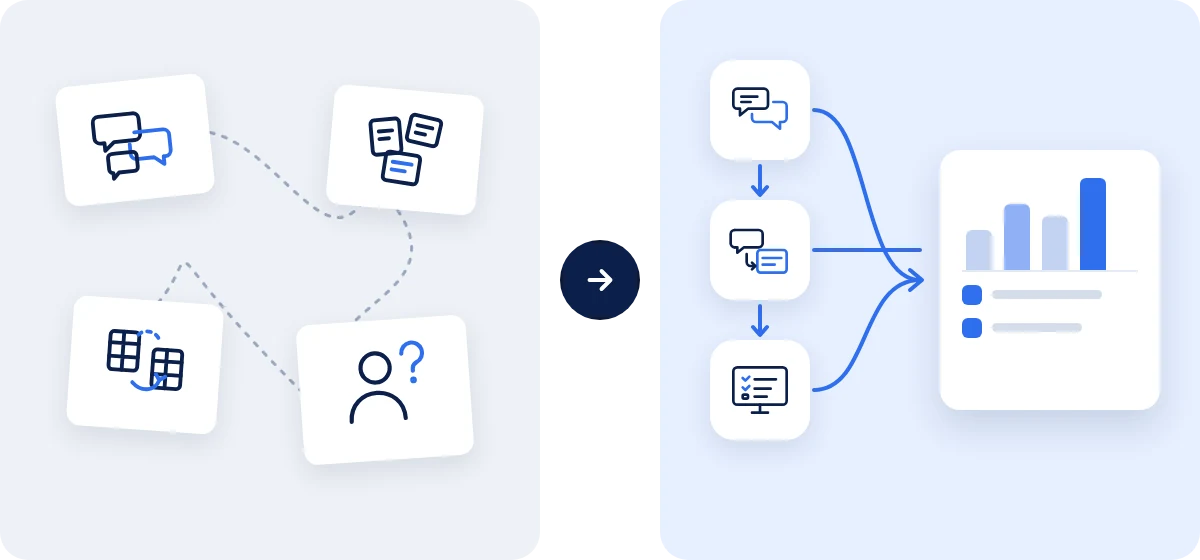
| Work continued by hand | Work that continues in the SE Dashboard |
|---|---|
| Today’s tasks and reports are written again in many places | Today and next-day work goals and completion reports continue on their own screens |
| You have to ask to know the progress | Open work and project status are visible on the dashboard |
| Work sometimes moves on without the required review | A work card moves on only after supervisor review is finished |
| Client schedules have to be looked up separately | The client schedule shows dates and progress in one table |
| Payment messages are copied by hand | Incoming messages are saved as records and checked later |
6-STEP PROCESS
The timeline is agreed based on the scope of the work.
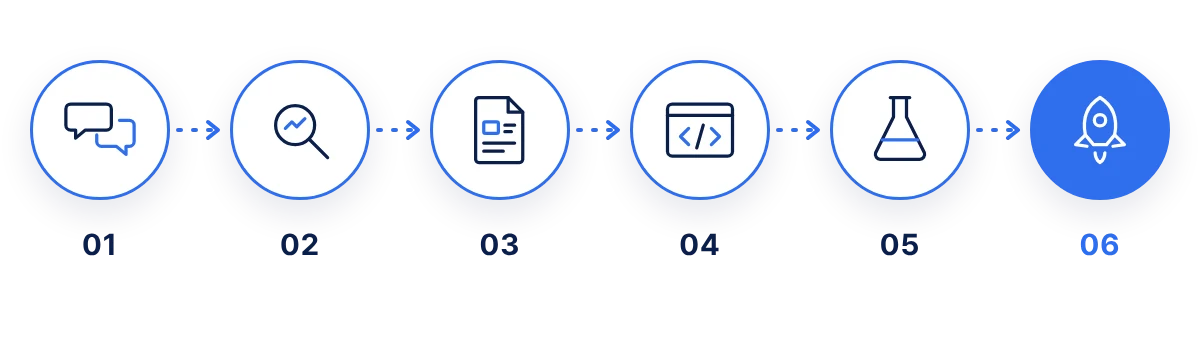
We review the work you do now and the points that cause friction. We separate what should be automated from the points a person must still review.
We look at who exchanges which information, and where reports and reviews break off.
We share a plan for the screens, permissions, alerts, and order of work.
We build the screens and features to match the plan, and we check in along the way to stay aligned.
We test it in the flow you will actually use, then adjust what is needed.
We stay with you for revisions and support after launch. Any features added later are discussed again.
CASES
The cases below are fictional. They do not use real names or real data. We do not invent results as numbers; we only describe how the work changes.
Situation: Today’s tasks and reports are scattered, so missed work is found late.
Setup: Open work and pending reviews are visible on the dashboard, and today and next-day work goals and completion reports are recorded separately.
What changes: Missed work is seen first on screen, and there is less need to ask around about progress.
Situation: A required review is sometimes missed before work moves to the next step.
Setup: The order is set from data backup through supervisor review and completion, and work that needs a review is gathered in My reviews.
What changes: Reviews are not skipped, and progress can be seen on screen during a handover.
Situation: Progress on several items and client schedules have to be looked up separately.
Setup: The dashboard’s project status gathers progress and next actions, and the client schedule shows dates in one table.
What changes: You can follow on screen where each piece of work stands.
Situation: Incoming messages are copied by hand, so records are often late or missing.
Setup: When a message arrives, it is saved as a record so it can be checked and sorted later. Messages that need a check are gathered separately.
What changes: Fewer records are missed, and needed information is easier to check.
WHY SE COMPANYPLUS?
We plan by looking at the actual work. We do not expand features that will not be used.
Consultation, planning, development, and the trial run are handled by one team, in sequence.
We separate screens by permission, so only the information that should be seen is shown.
We stay with you for revisions and support after launch.
We leave the steps that a person must review, and let reports and records follow that order.
PRICING
The setup changes with the scope of the work, the records to connect, and the number of people who will use it. After we confirm the features you need in a consultation, we provide a quote. The timeline is agreed together.
START WITH WHAT REPEATS
You do not have to change every task at once. Start the consultation with the reports and reviews that repeat most often.
SE COMPANYPLUS Co., Ltd.
Daegu Headquarters | 6F, 149 Joam-ro, Dalseo-gu, Daegu, Republic of Korea
Gyeonggi·Incheon Branch | Unit 401, Woochang Bldg., 1 Seunghak-ro 483beon-gil, Seo-gu, Incheon, Republic of Korea (Geomam-dong)
Email: dotoly7080@secompanyplus.com